Documentsgapless-video-playback
Gapless video playback
Play videos back to back without a gap by choosing MPV/piplayer or Native media player.
Current players can play videos back to back without a gap when they follow each other in a playlist.
To get gapless playback:
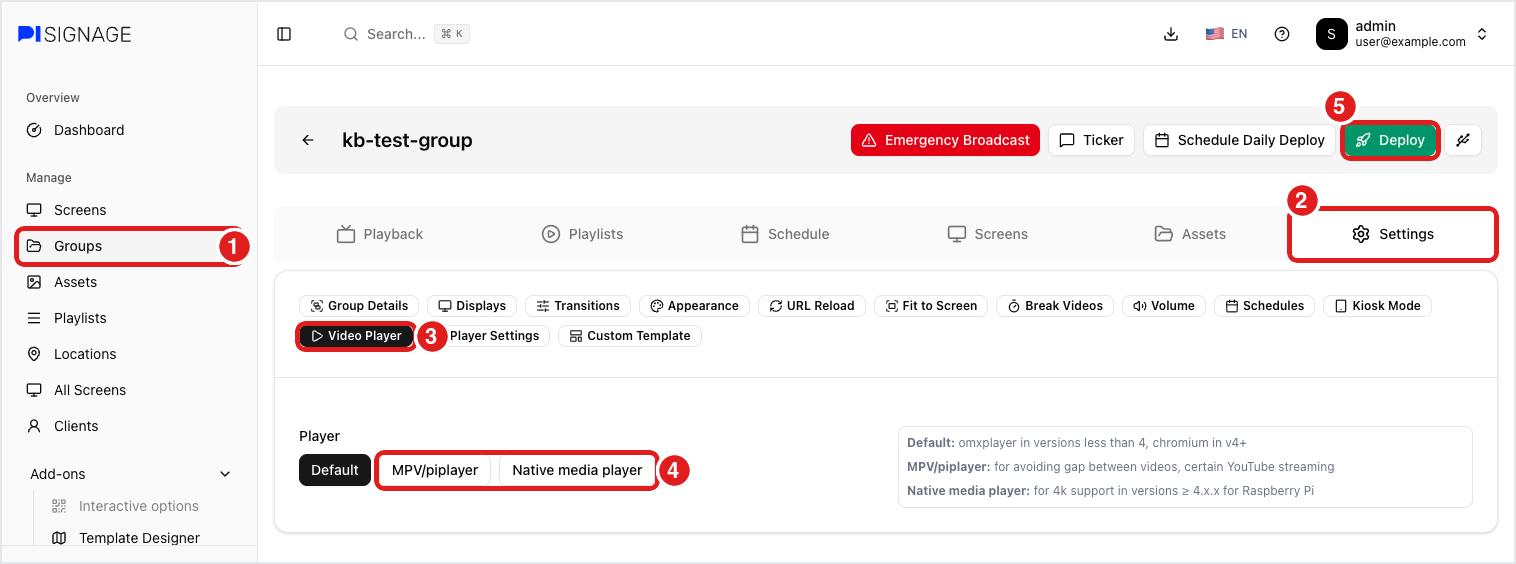
- Go to Groups, open your group, then Settings → Video Player.
- Choose MPV/piplayer (recommended for Pi Zero 2 W and Pi 3 on the latest 5.6.x images and above) or Native media player, then save and Deploy.
- Place the videos next to each other in the playlist.
If there is still a gap, check:
- Default video player: if the group uses Default, Chromium plays each video separately. Switch to MPV/piplayer or Native media player.
- Layout: with Native media player, only the main zone of a full-screen layout plays gaplessly.
- Other assets: images, web pages or other assets between videos always end the gapless run.
- Features that turn it off: advertisement playlists, "stop video at time", synchronized playback, and RSS or local-folder assets.
- Pi 5 with Native media player: videos with different resolutions play separately, so encode them at the same resolution.
- Pi Zero 2 W and Pi 3: videos switch in about 0.1 s rather than with no gap at all.