Documentsplayer-subscription-and-credits
Player subscription and credits
Credits pay for your players each month - here is how they get used and topped up
A managed license includes one player license and 12 subscription credits at pisignage.com. The first 2 screens are free, so 24 free credits are added to your account every year.
How credits are used
- On each monthly billing date, 1 credit is deducted per registered player.
- Extra storage costs 1 credit per 2 GB, deducted monthly.
- A payment reminder email is sent when credits run low.
If credits run out you cannot deploy, and players do not receive new settings until you add credits. Players keep playing their current content.
In the new UI
- Go to Subscription and License.
- The Subscription card shows how many months your credits will last, the credits remaining and your next billing date.
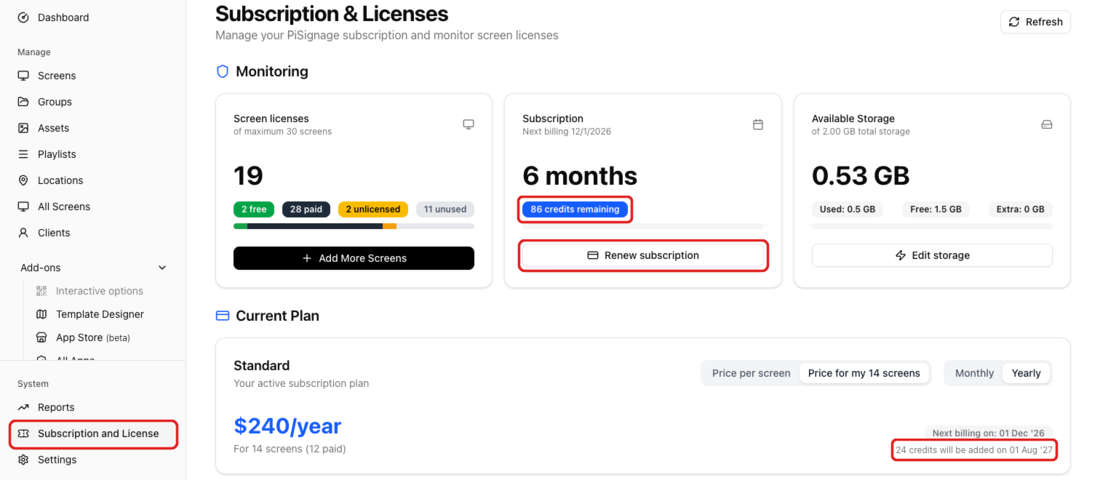
- Current Plan shows when the next free credits will be added.
- To buy credits, click Renew subscription and choose a yearly, monthly or custom period.
- The Billing History tab lists your billing events.
Subscriptions and Licenses covers the page in full.
In the legacy UI
Your subscriptions and remaining credits appear in the Subscriptions tab. You can buy credits at any time, in multiples of 12, with the Subscriptions Renewal button.
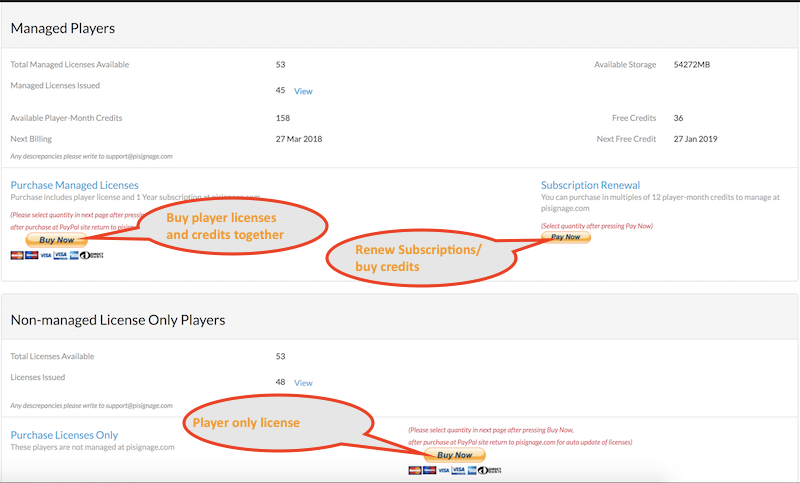
See also How to purchase licenses and subscription at pisignage.com.